
Behind every successful ecommerce campaign is more than a great idea. There are product photos to shoot, ads to design, emails to prepare, product pages to update, and deadlines to meet. When several teams are involved, keeping everything moving can quickly become complicated. That's where creative operations comes in. Creative operations is the system of people, processes, and tools that helps businesses plan, produce, review, organize, and deliver creative content efficiently. For ecommerce brands, it connects everything from product photography and marketing design to campaign approvals and digital asset management.
A well-organized creative operations workflow makes it easier to launch products, maintain brand consistency, and produce content without unnecessary delays. More importantly, it gives creative teams the structure they need to focus on creating work that matters. In this guide, we'll explore how creative operations works, why it matters for ecommerce, and how to build a practical system that grows alongside your brand.
What Is Creative Operations?
Creative operations, often called creative ops, refers to the processes, people, and technology used to manage creative work from initial request to final delivery. It brings organization to the entire content production process, ensuring that creative projects have clear objectives, assigned responsibilities, realistic timelines, and consistent quality standards. Think about what happens when an ecommerce brand prepares to launch a new collection.
The marketing team needs campaign visuals. The ecommerce manager needs product images. The social media team needs short-form videos. Designers need approved brand guidelines, while photographers need product samples and detailed shot lists. Without a structured system, requests arrive through different channels, feedback gets lost, and teams end up working with outdated files.
Creative operations connects these activities into one coordinated workflow. It's not about limiting creativity with rules. It's about removing the confusion that prevents creative teams from doing their best work. While creative professionals focus on developing compelling visuals and messaging, creative operations management ensures the right information, resources, and approvals are available when needed.
Why Creative Operations Matter for Ecommerce Brands
Ecommerce brands face a particular challenge: they need a constant supply of high-quality content across multiple customer touchpoints. A single product might require studio photography, lifestyle images, marketplace listings, website banners, paid social advertisements, and email campaign graphics. Multiply that by dozens or hundreds of products, and the amount of creative work becomes substantial.
As a brand grows, relying on informal communication and scattered files becomes increasingly difficult. Here are the main ways ecommerce creative operations can help.
1. Faster Product Launches
Launching a product involves several connected tasks. Photography can't begin until products and samples are available. Designers need approved images, and the ecommerce team needs finished assets before publishing product pages. When these dependencies aren't clear, one delayed task can affect the entire launch. A structured ecommerce product launch workflow makes responsibilities and deadlines visible, helping teams identify problems before they become last-minute emergencies.
2. More Consistent Brand Content
Customers might discover a brand through Instagram, browse its website, and later see its products on a marketplace. Every interaction should feel connected. Creative operations supports brand consistency across channels by establishing shared visual guidelines, approved templates, and clear quality-control processes.
This helps ensure that product images, campaign graphics, and promotional materials reflect the same visual identity, regardless of who creates them.
3. Less Time Wasted on Revisions
Imagine a designer finishing an advertising campaign only to discover that the product packaging has changed. Now the creative assets need to be updated, reviewed, and exported again. Problems like this often begin with incomplete briefs or outdated information.
A defined creative approval workflow helps teams confirm requirements early, collect feedback in one place, and avoid unnecessary revision cycles.
4. Better Collaboration Between Teams
Creative production rarely belongs to one department. Marketing, merchandising, photography, design, ecommerce, and external agencies may all contribute to the same campaign. Creative workflow management gives these teams a shared understanding of what needs to happen, who owns each task, and when deliverables are expected.
The result is fewer misunderstandings and smoother collaboration.
5. More Scalable Content Production
Creating assets for ten products is manageable with a simple spreadsheet. Producing content for hundreds of SKUs across several channels requires more coordination. Scaling creative operations allows brands to increase production without having to reinvent their process with every campaign. Standardized briefs, reusable templates, organized asset libraries, and repeatable approval systems make growth easier to manage.
The Core Components of Creative Operations
A successful creative operations framework doesn't need to be complicated. However, it should cover several essential areas.
Creative Requests and Brief Management
Every project should begin with a clear request. A creative brief explains what needs to be created, who the content is for, where it will appear, and when it must be delivered. For example, a product photography brief might include:
Product names and SKUs
Required photography angles
Image dimensions and formats
Background and styling requirements
Reference images
Intended sales channels
Delivery deadlines
Review and approval responsibilities
Collecting this information before production begins reduces guesswork and helps creative teams work more efficiently.
Production Planning and Resource Allocation
Once a request is approved, the next step is determining how the work will be completed. This includes assigning photographers, designers, copywriters, editors, and other specialists while considering available time and resources. Effective creative resource management prevents projects from being assigned without checking whether the team can realistically complete them.
It also helps managers prioritize urgent product launches without constantly disrupting ongoing work.
Creative Production Management
Creative production management covers the actual creation of visual and marketing assets. For an ecommerce brand, this might include product photography, image retouching, video editing, graphic design, advertising creatives, product page content, and email visuals. The objective isn't simply to produce more assets. It's to build a repeatable creative production process that delivers the right content at the right quality.
Review and Approval Workflows
Most creative projects require feedback before publication. A structured approval process identifies who reviews the work, what each reviewer is responsible for, and how changes are requested. For example, the merchandising team might verify product accuracy, while the brand manager checks visual consistency.
Separating these responsibilities prevents conflicting feedback and helps avoid unnecessary approval rounds.
Digital Asset Management
Producing creative content is only one part of the process. Teams must also be able to locate and reuse it. Digital asset management (DAM) refers to the organized storage, management, and retrieval of files such as product images, videos, logos, and campaign graphics. For ecommerce businesses, a reliable asset management system helps teams find approved product visuals, identify the latest versions, and distribute content across different platforms.
Rather than repeatedly searching through folders or requesting files from colleagues, employees can work from a shared source of approved assets.
Performance Tracking
Creative operations should also help businesses understand whether their processes are working. Tracking production timelines, revision cycles, approval delays, and resource usage reveals where workflows can improve. Over time, these measurements help teams make better decisions about production planning and capacity.
How a Creative Operations Workflow Works
A creative operations workflow connects every stage of content production, from the initial idea to the final published asset. Although the details vary by company, most ecommerce brands can organize their workflow into six stages.
Step 1: Creative Intake and Briefing
The process begins when someone submits a creative request. For example, a marketing manager requests photography and advertising assets for a new skincare product. Instead of sending an informal message to the design team, the request is entered into a shared system with clear requirements.
The brief identifies the product, campaign objectives, necessary formats, target channels, and deadline. Before approving the request, the team checks whether the information is complete and whether the work aligns with current priorities.
Step 2: Planning and Assigning Resources
Next, the project is broken into individual tasks. The production manager might assign photography to an in-house studio, retouching to an external editor, and advertising layouts to the design team. Dependencies are identified so work happens in the correct order.
For instance, the designer may prepare layout templates while waiting for final photography, but cannot complete the campaign without approved product images. This stage makes deadlines and expectations more realistic.
Step 3: Content and Asset Production
With an approved plan, the creative team begins production. Photographers capture the required images. Retouchers refine selected shots. Designers build marketing visuals, and content teams prepare supporting copy. Using standardized specifications helps avoid problems later.
Product photography destined for multiple sales channels may need different crops, file formats, or background treatments. Identifying these requirements before editing saves time.
Step 4: Review, Feedback, and Approvals
Completed assets enter the review stage. Reviewers check product accuracy, brand consistency, technical specifications, and campaign requirements. Instead of sending feedback across several email threads, teams collect comments in one location.
A clearly assigned decision-maker provides final approval once the required changes are complete. This creates accountability and reduces the risk of multiple departments requesting contradictory revisions.
Step 5: Asset Management and Distribution
Approved assets are stored in an organized library. Files receive consistent names, relevant metadata, and clear approval status. They can then be prepared for different uses, including product detail pages (PDPs), social media campaigns, email marketing, and marketplace listings.
An effective digital asset workflow also identifies which files are current and which should no longer be used.
Step 6: Performance Tracking and Optimization
The workflow doesn't end when the content is published. Teams review how efficiently the project moved through production. Were deadlines met? Did approval cycles take longer than expected? Were additional assets requested after delivery?
Answering these questions helps identify recurring bottlenecks and improve future projects.
Creative Operations Examples for Ecommerce Brands
Understanding the process is easier when you see how it applies to everyday ecommerce activities.
Example 1: Launching a New Fashion Collection
Imagine an online clothing brand preparing to launch 40 new products. Each product needs front, back, and detail photographs, along with selected lifestyle images. The marketing team also needs promotional banners, social media visuals, and email graphics. Without coordinated planning, photographers might receive incomplete samples, designers might use the wrong color variations, and product pages could remain unfinished near launch day.
With a structured creative operations process, the brand can:
Create a master product list with approved SKUs and sample availability.
Develop a photography shot list covering all required views.
Schedule studio sessions based on product readiness.
Assign image selection, retouching, and quality-control tasks.
Route final visuals through product and brand approval.
Organize approved images by SKU and channel.
Deliver launch assets to the ecommerce and marketing teams.
The key advantage is visibility. Everyone knows which products are ready, which assets are still in production, and what could delay the launch.
Example 2: Managing Product Photography at Scale
Consider a beauty brand with hundreds of products and frequent packaging updates. Its ecommerce product photography workflow must accommodate new products, seasonal campaigns, and updated packaging without creating confusion. A reliable system might establish consistent lighting, camera angles, backgrounds, file naming conventions, and retouching standards.
The team can also maintain an asset library organized by SKU, product version, and intended channel. When packaging changes, the relevant images can be identified and replaced systematically rather than searching through unrelated folders. This is where product image management becomes a practical business capability, not simply a file organization task.
Example 3: Producing a Seasonal Marketing Campaign
A home decor brand is preparing for a holiday promotion. The campaign requires homepage banners, product collection imagery, social ads, promotional emails, and short videos. Creative operations helps the marketing team coordinate production around one campaign brief and visual direction.
Rather than creating every asset independently, designers can develop adaptable layouts and use approved photography across several formats. A shared calendar keeps publishing dates aligned, while a centralized approval process helps ensure that promotional claims and product information are accurate. This approach makes content production more predictable while preserving a consistent campaign identity.
How to Build a Scalable Creative Operations Process
You don't need a large creative department or an expensive software platform to improve creative operations. For most ecommerce brands, the best starting point is understanding how work already happens.
1. Map Your Current Creative Workflow
Start by documenting the journey of a typical creative request. Where does it originate? Who approves it? What happens before production begins? Where do delays usually occur? Include input from everyone involved, not just creative managers.
You might discover that designers regularly wait for product information, photographers receive last-minute shot changes, or marketing teams struggle to locate approved files. These are operational problems that can be addressed with clearer processes.
2. Create One System for Creative Requests
Avoid accepting project requests through disconnected email threads, chat messages, and verbal conversations. Instead, establish one intake process. This could be a simple shared form connected to a spreadsheet or project management board.
Require the essential information needed to assess and schedule each request. A centralized intake system helps prevent important tasks from being overlooked and makes it easier to prioritize competing projects.
3. Standardize Repeatable Tasks
Not every creative project needs a completely new process. Product photography, campaign banners, email graphics, and marketplace images often follow similar production steps. Create reusable templates, checklists, and guidelines for these recurring activities.
For example, a standard product photography checklist could cover sample verification, shot lists, file specifications, retouching instructions, and final quality control. Standardization reduces avoidable errors while leaving room for creative decisions.
4. Assign Clear Ownership
Every project needs someone responsible for moving it forward. Define who requests work, who manages production, who creates assets, and who provides final approval. For smaller brands, one person may handle several responsibilities. That's fine, provided ownership remains clear.
A simple responsibility matrix can be especially useful when several departments contribute to one launch.
5. Organize Your Creative Assets
Build a consistent system for storing completed files. Organize assets using meaningful categories such as product SKU, campaign, content type, and channel. Establish file naming conventions and distinguish approved versions from work in progress.
For example:
SKINCARE_SERUM_30ML_FRONT_PDP_V01.jpg
This name communicates the product, image view, intended use, and version. A logical naming system becomes particularly valuable when multiple people work with the same asset library.
6. Improve One Bottleneck at a Time
Avoid rebuilding every workflow at once. If approval delays are the biggest problem, begin by clarifying review responsibilities and consolidating feedback. If teams spend too much time searching for images, prioritize digital asset management.
Making targeted improvements is usually more manageable than introducing a complicated new system across the entire business.
7. Review and Refine the Process
As your catalog grows, your workflow will need to evolve. Schedule regular reviews with creative and ecommerce teams to discuss recurring issues, production capacity, and upcoming campaign requirements. A scalable content production system should be structured enough to provide consistency but flexible enough to adapt to changing business needs.
Creative Operations vs. Creative Project Management
Creative operations and creative project management are closely related, but they serve different purposes. Creative project management focuses on delivering individual projects, while creative operations focuses on improving the overall system used to deliver creative work.
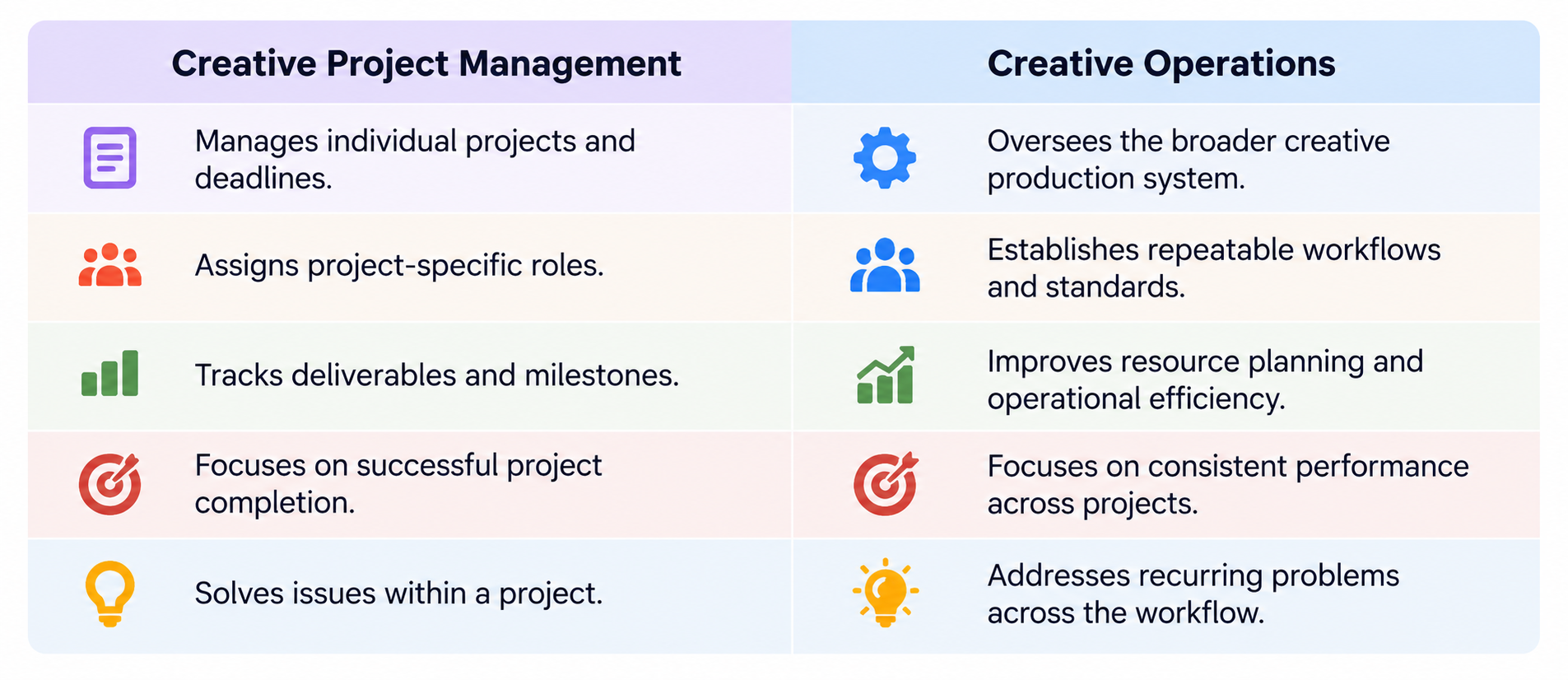
For example, a project manager might coordinate the assets needed for a Black Friday campaign. A creative operations manager would examine how campaigns are requested, scheduled, produced, approved, and delivered throughout the year. Creative operations is also different from marketing operations.
Marketing operations generally manages marketing systems, processes, data, and campaign execution. Creative operations concentrates on the production and management of the content that supports those activities. These functions often work together, particularly within growing ecommerce organizations.
Creative Operations Tools and Software
The right creative operations tools depend on the size of your team, the amount of content you produce, and the complexity of your workflows. There is no single platform that every ecommerce brand needs. Instead, think about the specific operational problems you want to solve.
Project and Workflow Management
Tools such as Asana, Monday.com, and Trello can help organize creative requests, assign responsibilities, monitor deadlines, and track project progress. They are useful when several people need visibility into the same production schedule.
Design and Collaboration
Platforms such as Adobe Creative Cloud and Figma support different aspects of creative production and collaboration. Shared libraries, design components, and feedback capabilities can help teams maintain consistency while working on multiple assets.
Digital Asset Management
Dedicated DAM platforms, such as Frontify and Dash, are designed to help businesses organize, manage, and distribute approved creative assets. For growing ecommerce teams, searchable asset libraries and permissions can make content reuse more manageable. Smaller teams may begin with well-structured cloud storage before moving to a dedicated platform.
Automation and Integrations
Automation tools can connect systems and reduce repetitive administrative work. For example, an approved request might automatically create a project task, notify the assigned team member, or update a production tracker. The objective should be to simplify the workflow rather than add more technology than the team needs.
Before purchasing new software, consider whether your existing tools can support a clearer process.
How AI Can Improve Creative Operations
Artificial intelligence is becoming increasingly relevant to ecommerce content production, particularly when teams need to manage large numbers of assets. However, the most useful applications of AI in creative operations often involve supporting repetitive tasks rather than replacing creative judgment. Here are several practical opportunities.
Asset tagging and organization: AI-assisted systems can help identify visual content and suggest descriptive metadata, making large asset libraries easier to search. Image resizing and adaptation: Automation can help prepare approved visuals for different formats and channels, reducing repetitive editing work. Background editing: AI-powered tools can support product image preparation by removing or adjusting backgrounds, provided the final result accurately represents the product.
Content variations: Teams can use AI-assisted creative tools to explore alternative layouts, compositions, or campaign concepts. Workflow coordination: Automated notifications, task assignment rules, and status updates can reduce administrative overhead. AI-generated product imagery can also support selected marketing use cases, such as creating lifestyle concepts from existing product photography.
But these workflows require quality control. For ecommerce businesses, product accuracy is especially important. AI-generated visuals should not introduce misleading details about materials, dimensions, packaging, colors, or product features. Human reviewers should remain responsible for checking brand alignment, technical quality, and truthful representation.
The most effective AI creative workflow automation combines speed with clearly defined review standards.
Creative Operations Best Practices for Ecommerce Brands
Building a workflow is a good start. Maintaining it consistently is what makes it valuable. These practical habits can help creative teams operate more effectively.
Keep Briefs Clear and Actionable
A useful creative brief should explain the business objective, audience, deliverables, and constraints without overwhelming the team with unnecessary information. When requirements change, update the original brief so everyone works from the same information.
Limit Unnecessary Approval Layers
More reviewers don't automatically produce better work. Assign reviewers based on their responsibilities and identify one final decision-maker whenever possible. This helps prevent repeated feedback and conflicting instructions.
Build Around the Product Catalog
For ecommerce brands, SKU-level organization can make asset management significantly easier. Connecting visual assets to accurate product information helps teams identify missing images, manage product variations, and respond to catalog changes.
Reuse Approved Assets Strategically
A successful photoshoot may produce content suitable for product pages, email campaigns, social media, and paid advertising. Plan for these potential uses before production begins. Content repurposing can reduce repeated work, but assets should still be adapted to the requirements of each channel.
Protect Creative Time
Creative teams need uninterrupted time to produce thoughtful work. Frequent urgent requests, changing priorities, and unclear feedback can disrupt that process. A visible production calendar and agreed request priorities help balance flexibility with realistic workloads.
Document What Works
When a campaign runs smoothly, identify which processes contributed to its success. Save useful templates, checklists, and production guidelines so future projects can benefit from them. Over time, these improvements become part of the brand's creative operations strategy.
How to Measure Creative Operations Success
Creative operations KPIs help brands understand whether their production processes are becoming more efficient. You don't need dozens of metrics. Start with a small set connected to your team's biggest operational challenges.
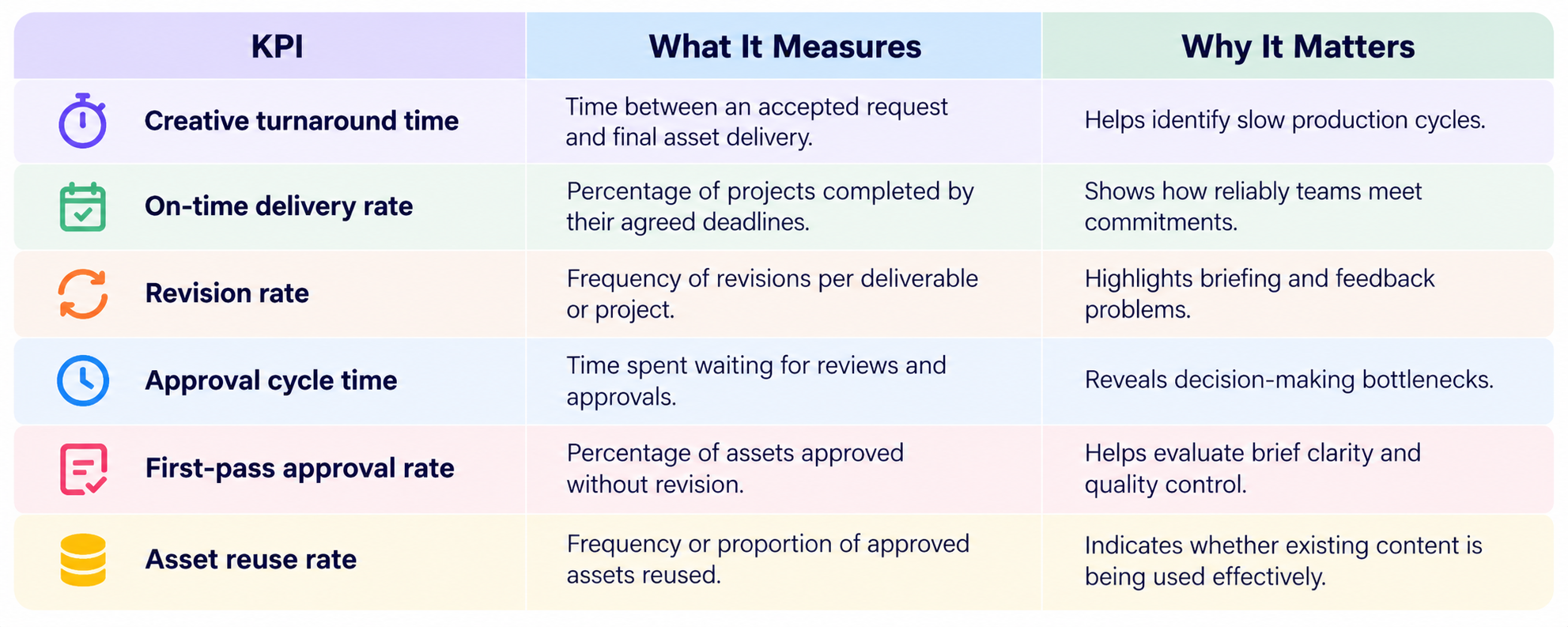
For example, suppose a brand regularly requires eight business days to complete a standard product photography request. After introducing clearer shot lists and a centralized review process, the team can compare future turnaround times against that baseline. If production becomes faster without sacrificing image quality, the changes may be working.
However, speed shouldn't be measured in isolation. A team that delivers assets quickly but produces inaccurate images or requires frequent corrections is not necessarily operating efficiently. Review operational metrics alongside quality standards and, where relevant, campaign performance.
Ultimately, creative operations should help teams produce reliable, high-quality content with less unnecessary effort.
Creative Operations Checklist for Ecommerce Brands
If you're ready to improve your ecommerce creative workflow, use this checklist to evaluate your current process.
Establish a centralized system for creative requests.
Create standardized briefs for recurring content types.
Assign owners to every production stage.
Maintain a shared creative production calendar.
Document product photography and editing requirements.
Define clear review and approval responsibilities.
Organize digital assets by product, campaign, and channel.
Implement consistent file naming and version control.
Store approved brand guidelines and templates in one accessible location.
Identify opportunities for safe workflow automation.
Track turnaround times, revisions, and delivery performance.
Review workflow bottlenecks regularly.
You don't need to implement everything immediately. Start with the areas causing the most delays or confusion, then expand the system as your team becomes more comfortable with it.
Final Thoughts: Making Creative Operations Work for Your Brand
Creative operations isn't about turning creativity into a rigid production line. It's about making the work behind great creative content more organized, predictable, and manageable. For ecommerce brands, that means having a clear process for everything from product photography and campaign planning to approvals, asset management, and publishing. When teams know what needs to be created, who is responsible, and where approved assets belong, they can spend less time resolving confusion and more time developing content that supports the business.
The most effective creative operations system is not necessarily the most complicated one. It's the system your team can consistently use. Start by fixing one recurring bottleneck, create a repeatable process, and improve it as your brand grows. Because as ecommerce content demands increase, the ability to produce creative work consistently becomes just as important as the ideas behind it.
