
Imagine finding a beautiful jacket online. The first photo looks great, but what about the back? How does the fabric look up close? Is the fit oversized or slim? And what does it actually look like on someone? When those questions go unanswered, even an attractive product can be difficult to buy.
That's why ecommerce product images need to do more than make a product look appealing. They should help shoppers understand exactly what they're buying, how it looks, how it works, and whether it's right for them.
A well-planned ecommerce product page typically combines a clear hero image, multiple product angles, close-up details, lifestyle photography, and size references. Depending on the product, you may also need feature images, color variations, packaging photos, or customer-generated content. The goal isn't to fill your product gallery with as many photographs as possible. It's to provide the right visual information at the right moment.
Here's how to build a product image gallery that answers customer questions and supports confident buying decisions.
Why Product Images Matter for Ecommerce
Shopping online removes one of the biggest advantages of visiting a physical store: the ability to examine a product in person. Customers can't pick up a handbag, feel the texture of a sweater, or see how a table fits into their living room. They depend on your product description, specifications, reviews, and, most importantly, the images that bring those details to life. Good ecommerce product photography helps bridge that gap.
Clear, informative images can help shoppers:
Understand a product's appearance, size, and proportions.
Examine materials, textures, and important details.
See how an item works or looks in everyday situations.
Compare available colors, styles, and configurations.
Feel more confident about making a purchase.
Poor product photography can create unnecessary uncertainty. An image may look beautiful while revealing almost nothing useful about the item itself. For example, an atmospheric photo of a skincare bottle surrounded by flowers might work well in an advertising campaign. But if it's the only image on the product page, shoppers still won't know what the label says, how large the bottle is, or what the product's texture looks like.
The best product images balance visual appeal with practical information.
10 Essential Types of Product Images for an Ecommerce Product Page
Not every product needs all ten image types. However, understanding what each one contributes makes it much easier to decide which images deserve a place in your gallery.
1. Hero Product Image: Make the First Impression Clear
Your hero product image is the main photograph customers see when they open a product page. Its job is straightforward: show the product clearly and accurately. For most online stores, a clean studio photograph against a white or neutral background is an excellent starting point. It keeps attention on the product and makes its shape, color, and design easier to examine.
A strong hero image should:
Show the entire product without awkward cropping.
Use lighting that represents its actual appearance.
Keep distracting props and decorations to a minimum.
Present the product from its most recognizable angle.
Stay consistent with the visual style of your store.
White background product photography is especially useful for cosmetics, electronics, accessories, and other products where the customer needs an unobstructed view. That doesn't mean every brand has to use a pure white background. A subtle neutral backdrop or carefully styled setting can work just as well when it helps rather than distracts.
Practical tip: If shoppers can identify the product immediately without reading the title, your hero image is doing its job.
2. Multiple-Angle Product Photos: Show the Whole Product
One photograph rarely tells the whole story. A pair of shoes might look perfect from the side, but customers may also want to examine the toe shape, sole, heel, and back. Similarly, someone shopping for a backpack may want to see its straps, compartments, and interior. Multiple-angle product photography provides the visual coverage that a single hero image cannot.
Useful angles include front, back, side, top, bottom, and interior views, depending on the item. Each image should offer something new. Five photographs taken from nearly identical positions won't necessarily be more helpful than three carefully chosen angles.
Consider a leather handbag. A useful gallery might show its front, side profile, open interior, and back. Together, these images communicate far more than several nearly identical front-facing shots. The idea is simple: show the product from the angles a customer would naturally inspect in a store.
3. Close-Up and Detail Shots: Let Customers See the Quality
Sometimes, the details are what make a product worth buying. A close-up of leather stitching can reveal craftsmanship. A detailed photograph of a necklace clasp can help customers understand its construction. A skincare texture shot can show whether a formula looks lightweight, creamy, or gel-like. Close-up product photography brings attention to the features customers might otherwise miss.
Detail shots are especially valuable for products where materials and finishing influence purchasing decisions, including fashion, jewelry, furniture, cosmetics, and handmade goods. Focus on details that matter to the buyer, such as fabric texture, stitching, surface finish, fasteners, controls, or decorative elements. Avoid excessive editing that smooths away genuine textures or changes how the product appears.
A polished image is useful. A misleading one isn't.
4. Lifestyle Product Photography: Show the Product in Real Life
Studio images explain what a product looks like. Lifestyle product photography helps customers imagine what it would be like to own it. A sofa photographed against a white backdrop shows its design. The same sofa placed in a thoughtfully furnished living room helps shoppers understand its style, proportions, and how it might fit into their home.
Lifestyle images work particularly well for fashion, home decor, beauty, fitness products, and accessories. They can show products being worn, used, carried, applied, or displayed in realistic settings. But lifestyle photography should still be honest. The surroundings shouldn't obscure the product, and props shouldn't make it unclear what is included in the purchase.
For example, if you're selling a decorative lamp, a lifestyle image can show the lamp illuminating a bedside table. Just make sure the gallery also includes clear product-only images so customers can distinguish the lamp from the surrounding decor.
A good lifestyle image answers the question: "What would this product look like in my life?"
5. Size and Scale Reference Images: Remove the Guesswork
Size is surprisingly difficult to judge from a photograph. A small decorative vase can appear large in a tightly cropped image. A compact handbag may look oversized without a person holding it. This makes in-scale product images particularly important.
According to Baymard Institute's product-page usability research, 42% of users attempted to determine a product's size from its images. Without a clear size reference, shoppers can easily form the wrong impression. An in-scale image shows a product alongside something that provides a familiar size reference. Examples include:
A handbag carried by a person.
A coffee mug held in someone's hand.
A chair positioned beside a dining table.
A lamp displayed on a bedside table.
A small electronic device shown next to a laptop.
For clothing, photographs on models can help shoppers understand fit and proportions. Including model measurements and the size being worn makes those images even more useful. Remember that scale photography complements written dimensions; it doesn't replace them.
6. Feature and Infographic Images: Explain What Makes the Product Useful
Some products have features that aren't immediately obvious from their appearance. A wireless speaker may have multiple connectivity options. A suitcase could include an expandable compartment. A skincare product might have a specific applicator or dispensing mechanism. Feature images help explain those details visually.
They often combine a product photograph with short labels, arrows, or simple diagrams that identify important functions. For example, an electronics product page might use an annotated photograph to identify ports and buttons. A backpack listing could highlight a padded laptop compartment, adjustable straps, and water-resistant fabric.
Keep these images easy to understand. Too much text can overwhelm the photograph, particularly on smaller screens. And whenever possible, describe important features in the product page's written content as well, so the information remains accessible and easy to find.
7. Product Variation Images: Show Every Important Option
If a product comes in several colors, finishes, or styles, customers should be able to see the version they're considering. A small color swatch may not provide enough information to understand how a shade looks across an entire product. Product variation images are especially valuable for clothing, footwear, furniture, cosmetics, and accessories.
For example, if a jacket comes in black, beige, and olive green, ideally each variation should have its own accurate images. The same principle applies to other differences, such as fabric, finish, pattern, or configuration. Where supported by your ecommerce platform, selecting a variant should update the main image to show that exact option.
Consistency matters here. Photographing each variation under comparable lighting helps shoppers make meaningful comparisons.
8. Packaging and What's Included Images: Set Clear Expectations
One question customers often have before ordering is: "What exactly will arrive?" Packaging photography helps answer it. This type of image can show the retail box, product container, protective packaging, included accessories, or everything contained in a set.
It's particularly useful for beauty products, gift sets, electronics, subscription boxes, and bundled items. Imagine selling a camera kit. A clear what's-included image can show the camera, battery, charging cable, and any other accessories included with that specific package. This reduces confusion between items that are part of the purchase and props used for styling.
For gift-oriented products, packaging images can also help shoppers understand the presentation.
9. Customer and User-Generated Photos: Add Real-World Perspective
Professional product photography gives brands control over lighting, composition, and presentation. Customer-generated images offer something different: an additional perspective on how products appear in everyday settings. User-generated product images may show clothing worn by different body types, furniture inside actual homes, or accessories styled in different ways.
They can complement professional photography by providing context that polished studio images don't always capture. However, customer images should be authentic, relevant, and used with appropriate permission. They shouldn't replace clear official photographs or be presented as verified customer experiences if they're staged or artificially generated.
When managed carefully, customer photography can help shoppers evaluate products from more than one perspective.
10. Product Comparison Images: Make Decisions Easier
Comparison images are useful when shoppers need to understand differences between similar products or versions. They might compare two suitcase sizes, show available furniture dimensions side by side, or illustrate differences between product configurations. A useful comparison image should make the distinction immediately understandable.
For instance, placing a 20-inch carry-on next to a larger suitcase helps customers compare proportions much faster than asking them to interpret two separate photographs. Comparison images can also demonstrate a product feature or a genuine before-and-after result when that presentation is appropriate and accurately represented.
Avoid unrealistic claims, manipulated results, or comparisons that make one option appear worse through inconsistent photography. The purpose is to clarify a buying decision, not manufacture an advantage.
How Many Product Images Does an Ecommerce Product Page Really Need?
There isn't one perfect number of product images for every ecommerce product page. A simple ceramic cup may need fewer photographs than a multifunctional travel backpack. A pair of jeans requires different visual information than a laptop.
As a practical starting point, many relatively simple products can be covered with around five to eight well-chosen images. More complex products may benefit from additional photographs, diagrams, or demonstrations. These are planning guidelines, not fixed conversion benchmarks. Instead of counting photographs first, think about the questions your customer needs answered.
A basic product gallery could include:
One clear hero product image.
Two or three photographs showing different angles.
One or two close-up images highlighting important details.
One lifestyle image showing the product in use.
One image that communicates size or scale.
Then add photographs for variations, packaging, compatibility, or other product-specific information. The most important rule is to avoid repetition. Every image should serve a purpose. If two photographs communicate exactly the same information, you may not need both.
Product Image Requirements by Category
Different products create different questions in the shopper's mind. Someone buying clothing needs to understand fit and fabric. Someone buying electronics wants to examine ports, controls, and compatibility. Furniture buyers care about dimensions and how pieces look in a room. Here's a practical way to prioritize product image types across common ecommerce categories.
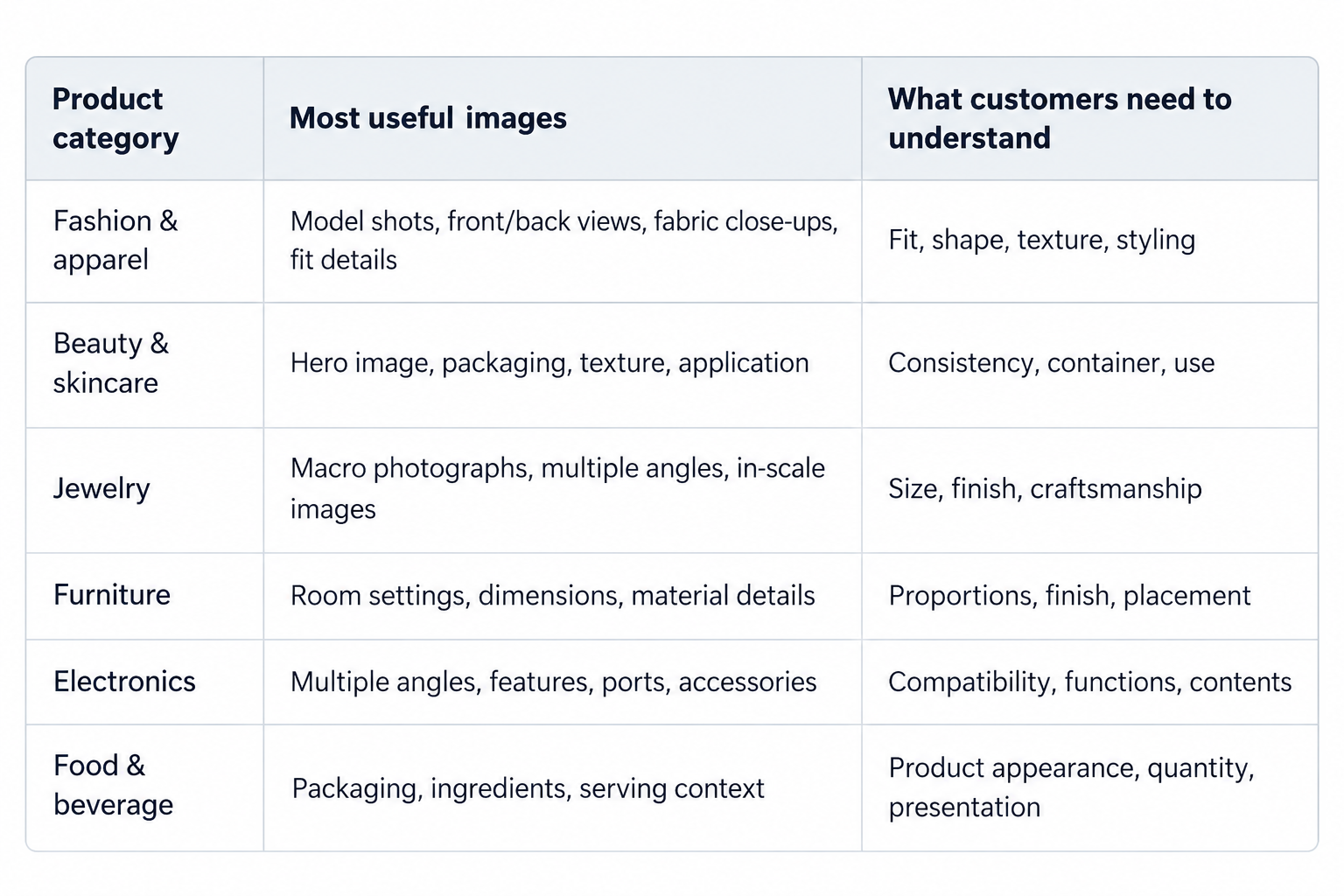
These are starting points rather than strict requirements. A handmade ceramic mug, for example, may benefit from a close-up showing its glaze and surface variations. A technically complex kitchen appliance might need annotated feature images and a short demonstration video. Think about the uncertainties specific to your product category, and prioritize images that resolve them.
How to Optimize Product Images for Ecommerce SEO
Creating strong product images is only part of the process. You also need to make sure customers can view them comfortably and search engines can understand them. Product image SEO involves technical optimization, useful descriptions, and a well-organized product page.
Use Descriptive Image File Names
File names offer search engines a small clue about the image's content. Instead of uploading a photograph named IMG_0048.jpg, use a meaningful description such as:
black-leather-handbag-front-view.webp Keep file names concise and relevant. There's no benefit in repeating the same keyword several times.
Write Helpful Image Alt Text
Alt text describes an image for people who cannot see it, including users of screen readers. It also helps search engines interpret visual content. A useful example would be:
"Black leather handbag with gold clasp photographed from the front." That's more informative than "handbag" and more natural than stuffing the description with several ecommerce keywords. Write alt text based on what the image actually shows and the context in which it's used.
Choose the Right Image Size and Format
High-resolution product images allow customers to examine details, but unnecessarily large files can slow down a product page. For Shopify stores, the platform recommends 2048 × 2048 pixels as a useful size for square product photographs. This isn't a universal requirement for every image or ecommerce platform. JPEG, WebP, AVIF, and PNG can all be suitable depending on image content, browser support, and platform capabilities.
The best choice balances visual quality and file size. Keep image dimensions and aspect ratios consistent where possible, especially for photographs displayed together in galleries or product grids.
Compress Images Without Sacrificing Important Details
Image compression reduces file size and can improve loading performance. This matters because customers need detailed product photos, but they shouldn't have to deal with unnecessarily slow pages. When compressing images, check areas such as fabric texture, jewelry details, product labels, and fine edges.
Compare the optimized image against the original at its actual display size. If compression makes a product look blurry or hides details customers need, it's too aggressive.
Design an Easy-to-Use Product Image Gallery
Even excellent photographs can be frustrating if the gallery is difficult to navigate. A good product image gallery should make it easy to move between photographs, zoom into important details, and understand which product variation is being displayed. On mobile devices, images should remain clear and controls should be easy to use without accidental taps.
Avoid galleries where important details are hidden behind confusing navigation or where users cannot enlarge photographs sufficiently.
Pay Attention to Image Loading
Responsive image delivery helps browsers load appropriately sized files on different devices. Lazy loading can also improve performance by delaying images that aren't immediately needed. However, the main product image visible when the page opens should generally load promptly rather than being unnecessarily delayed. Make sure essential images remain accessible to search engine crawlers.
Google Search Central recommends using standard HTML image elements, responsive image techniques, descriptive alt text, and effective image optimization. For ecommerce product pages, valid Product structured data can also help search engines understand product information, including associated product images, when implemented according to Google's requirements.
Ecommerce Product Photography Checklist
Before publishing or updating a product page, use this checklist to review your ecommerce product images.
Image Coverage
The main product image is clear and accurate.
Multiple angles show important parts of the product.
Close-up images reveal relevant materials or details.
At least one image provides useful lifestyle or usage context where appropriate.
Customers can understand the product's size and proportions.
Important features are clearly illustrated.
Product variations are represented accurately.
Packaging and included accessories are shown when relevant.
Image Quality and Usability
Lighting and color representation are consistent.
Product details are sharp enough to examine.
Images aren't misleading or excessively edited.
The gallery is easy to navigate on mobile.
Customers can enlarge images to see important details.
Photographs add new information rather than repeating the same view.
Image SEO
Image file names are descriptive.
Informative images have useful alt text.
File sizes are optimized for loading performance.
Responsive images are supported where appropriate.
Images use suitable formats and consistent dimensions.
Important product images can be discovered and indexed by search engines.
You don't necessarily need every image type on every listing. The checklist is designed to help identify gaps that matter to your customers.
Can AI-Generated Product Images Replace Traditional Photography?
AI product photography and virtual product imagery can help ecommerce businesses create additional visual content, particularly for backgrounds, lifestyle settings, and creative campaigns. For example, a brand may use AI tools to place an existing product photograph into different visual environments without organizing a separate photoshoot for every setting.
That can be useful for testing creative directions or producing supporting visual content. However, accuracy remains essential. AI-generated images can sometimes change proportions, packaging text, materials, colors, or other important details.
A product might look attractive in an AI-generated scene while no longer matching the item a customer will receive. For this reason, verified product photography should remain the reference for factual details such as appearance, texture, dimensions, and included components. AI can expand a product's visual presentation, but it shouldn't introduce information that misleads buyers.
Final Thoughts: Every Product Image Should Have a Purpose
An effective ecommerce product page doesn't need an endless gallery of beautiful photographs. It needs images that help customers make decisions. Start with a clear hero photograph, show the product from useful angles, and include details that would matter if someone were examining the item in person. Then add lifestyle, scale, feature, or comparison images wherever they make the product easier to understand.
Make sure your images are accurate, easy to navigate, mobile-friendly, and optimized for search and performance. The most useful ecommerce product photography checklist isn't simply a list of images to produce. It's a way to identify what shoppers still need to know before they feel comfortable buying.
When every image answers a real customer question, your product gallery becomes more than a visual showcase. It becomes a practical part of the buying experience.
