
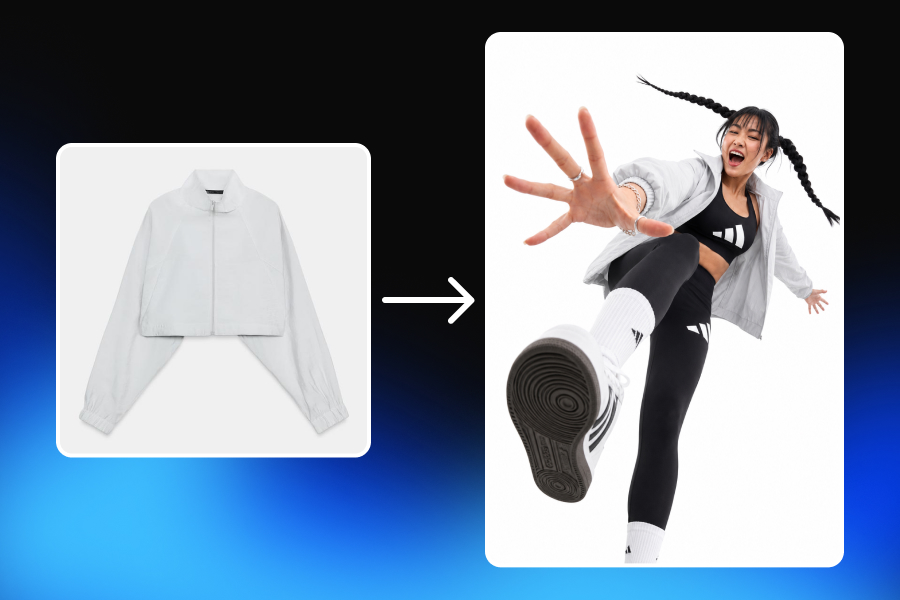
Selling a product online begins long before a customer reads the description or checks the reviews. In most cases, it begins with an image.
A shopper scrolling through a marketplace or online store cannot touch the fabric, hold the packaging, examine the finish, or see how the product looks in a real environment. Product images have to close that gap. They introduce the product, explain its details, create context, and help the customer decide whether to keep looking or move on.
The problem is that producing enough high-quality ecommerce product images has traditionally been expensive and slow. A single product may need a clean hero image, several angles, detail shots, lifestyle scenes, seasonal creatives, advertising visuals, and different crops for different channels. Multiply that by dozens or hundreds of SKUs, and product photography quickly becomes a continuous production operation.
AI product photography is changing that process. Instead of organizing a new photoshoot every time a brand needs another visual, sellers can now use an existing product image as the starting point for different scenes, compositions, and campaign variations. An AI product image generator can significantly shorten the distance between an idea and a usable visual.
However, generating an image quickly is only one part of the job. The real challenge is creating product images that are actually ready to be used: clear enough for a listing, accurate enough to represent the real product, believable enough to build trust, and flexible enough to work across different parts of an ecommerce business.
So, how do you go from one product photo to a complete set of professional, marketplace-ready visuals? Let us go through the process from beginning to end.
What Are Marketplace-Ready Product Images?
A marketplace-ready product image is not simply a beautiful photograph. It is an image created for a specific commercial purpose.
This distinction matters because ecommerce images perform different jobs throughout the buying journey. The first image in a product listing may need to communicate the product instantly. A lifestyle image helps the shopper imagine where or how the product is used. A detail shot can reveal material quality, texture, craftsmanship, or a feature that is difficult to explain with text. A good product gallery usually combines these roles rather than repeating the same image with different backgrounds.
For that reason, marketplace readiness depends on more than aesthetics. A strong ecommerce product image should make the product easy to recognize, preserve important design details, use believable light and perspective, maintain accurate proportions, and remain visually consistent with the rest of the gallery.
It also needs to fit its destination. The image you use as the main product photo may not be the one you use for a paid social campaign. A visual designed for a square marketplace thumbnail may need a different composition from a vertical mobile ad.
This leads to one of the most important principles of modern ecommerce photography:
Do not try to create one image that works everywhere. Build a visual system that can adapt to different purposes.
That is where AI product photography becomes much more valuable than simple background generation.
Why Traditional Product Image Production Becomes Difficult to Scale
For a small catalog, a traditional product photoshoot can be relatively manageable. But as an ecommerce business grows, the number of required visuals grows much faster than the number of products.
Imagine a store with 50 products. If each product needs a main image, two alternative views, a lifestyle image, a detail shot, and several campaign creatives, the content requirement quickly expands into hundreds of visual assets.
Then the business launches a seasonal campaign. A new marketplace is added. The advertising team needs new creatives. The social media manager needs vertical content. A product package changes. A new color variation is released.
The challenge is no longer taking a good photograph. It is maintaining a continuous content production system.
Traditional workflows are often fragmented. One team organizes the shoot, another edits the images, another prepares ad creatives, and another adapts them to marketplace formats. Every handoff takes time, and a small change can sometimes require returning to an earlier stage of production.
AI ecommerce photography offers a different approach. Existing product assets can become the foundation of an ongoing creative workflow in which scenes are created, visuals are refined, and successful directions are developed into additional variations. But the quality of that workflow depends on how you use it.
Uploading a random photograph and generating dozens of random backgrounds is not a strategy. A better process starts with the product itself.
What Do You Need Before Creating AI Product Photos?
You do not need a complete studio production setup to begin creating product images with AI. You do, however, need a reliable starting point.
The source image is important because the product is the one part of the scene that should not become creatively ambiguous. A background can change. The surface can change. The environment can change. The visual mood can change. The product itself should remain recognizable and accurate.
Before starting, look carefully at the source photo. Can you clearly see the overall shape of the product? Are important details visible? Is the real color represented reasonably well? Are logos, packaging elements, accessories, and distinctive features easy to inspect?
The better the system can understand the product, the easier it becomes to create useful visual variations around it. This is particularly important for categories where small details matter.
In jewelry, the direction and structure of a stone setting can change the product completely. In cosmetics, the shape of a cap, label placement, or packaging proportions may be part of the brand identity. In apparel, seams, patterns, fabric behavior, and closures matter. For furniture, dimensions and proportions influence whether the product feels believable inside a room. For technology products, ports, buttons, cameras, and other structural details need to remain accurate.
The source photo does not have to be glamorous. It has to communicate the product clearly. Once you have that, the creative process can begin.
Step 1: Decide Which Images Your Product Actually Needs
The biggest mistake many sellers make is starting with a vague goal: “I need better product photos.”
Better in what way?
Before generating anything, decide what the image needs to accomplish. A complete product listing may need several different visual roles. The main image introduces the product clearly. A lifestyle visual shows context. A close-up highlights a feature or material. An in-use image shows how the product interacts with a person or environment. A campaign image creates a stronger emotional or branded visual direction.
Not every product needs exactly the same image set. A ring and an office chair solve very different customer questions.
For a ring, buyers may want to see the setting, metal finish, scale on a hand, and how the piece looks in natural light. For an office chair, the customer may care more about overall proportions, back support, material texture, adjustment mechanisms, and how the chair fits into a workspace. For skincare, the gallery may need to communicate packaging, texture, application, routine context, and the overall feeling of the brand.
This is why successful ecommerce product photography should begin with the buyer's questions rather than the capabilities of the AI tool. Ask yourself: What does the customer need to understand before buying this product?
The answer should guide the visual set. Once those roles are clear, AI becomes much more useful because each generation has a purpose.
Step 2: Prepare the Product as a Reusable Creative Asset
In a basic AI image workflow, the user uploads an image, generates something, downloads the result, and starts again when another image is needed. That approach may work for occasional experimentation, but it is less effective for a brand producing content continuously.
A more scalable workflow treats the product as a reusable asset rather than a temporary input. This is part of the thinking behind Adject v2.0. Products, models, brand elements, and other files can remain available as reusable assets, while creative work continues inside projects and a shared visual canvas. Projects preserve the relationship between the assets used, generated visuals, edits, variations, and previous AI interactions.
Why does this matter?
Consider a cosmetics brand launching a new serum. The first visual might be a clean product composition. After that, the same product can be used to develop a bathroom scene, a close-up composition, a seasonal campaign concept, social media versions, and motion content. The creative work does not need to start from zero each time.
For an ecommerce team, this changes the basic question from “How do we generate another image?” to “How do we build more useful content from the visual direction we already have?”
That is a much more scalable approach.
Step 3: Create the First Visual Direction
Now it is time to generate the first image, but do not begin by creating as many variations as possible. Start with one direction.
A common mistake in AI product photography is confusing quantity with progress. It is easy to generate many images, but twenty unrelated outputs do not necessarily bring you closer to a usable campaign. Choose a clear visual direction first.
For example, a premium skincare product could be placed in a soft, warm bathroom environment with restrained styling and natural light. A technology product may work better with a clean architectural composition and controlled reflections. Jewelry may need close attention to skin, scale, lighting, and the orientation of the piece.
The first image should answer a few basic questions. Does the composition make the product easy to notice? Does the environment make sense for the category? Does the visual direction match the brand? Does the product appear naturally integrated into the scene? Most importantly, does the product still look like the real product?
At this stage, you are not trying to complete the entire campaign. You are establishing a visual direction that is strong enough to develop further.
In Adject, image generation takes place as part of the broader canvas workflow. The AI agent works within the creative environment, while users can continue modifying visuals and building variations without treating every generation as a disconnected result. That continuity becomes valuable during the next step: refinement.
Step 4: Refine the Image Instead of Generating From Zero
Suppose the first result is close to what you need. The background works, the composition is strong, and the lighting feels appropriate, but there is one unnecessary prop in the scene. Or perhaps the product needs more space around it. Maybe the surface should be changed, or a specific part of the environment needs to be adjusted.
A weak workflow would throw away the image and generate everything again. A better workflow edits what already works.
This sounds obvious, but it is one of the most important differences between experimenting with AI images and using AI for real commercial production. Good creative work usually comes through iteration. Photographers adjust light. Designers refine compositions. Art directors remove elements that distract from the product. AI workflows should allow the same process.
Adject integrates editing into the canvas environment, allowing users to modify selected areas, remove or replace elements, create variations, improve outputs, and adapt visuals without separating generation from the rest of the creative process.
The benefit is not just convenience. It also helps preserve creative direction. When a strong image can be refined rather than discarded, the team can develop a more consistent set of visuals around it.
Step 5: Check Product Accuracy Before Creating More Variations
This is the point where speed should slow down for a moment. Before turning the first successful image into a complete gallery, check the product carefully.
AI can create a photograph that looks convincing while quietly changing important details. That is why “Does this look realistic?” is not enough.
The better question is:
“Is this still the same product?”
Compare the generated image with the original. Check shape and proportions. Look at color. Inspect the logo. Read visible packaging text. Examine hardware, closures, stones, buttons, straps, seams, ports, or any other details relevant to the product.
Then look at how the product interacts with the scene. Does it sit naturally on the surface? Do the contact shadows make sense? Does the direction of light on the product match the light in the environment? Are reflections appropriate for the material? Is the product realistically scaled relative to nearby objects?
These details are especially important because a commercial image has a different responsibility from a purely creative image. A conceptual visual can take liberties. A product listing must represent something the customer may actually buy.
Product fidelity should therefore be a checkpoint in the workflow, not an afterthought. Fixing an accuracy issue in the first approved direction is much easier than discovering the same problem after creating an entire gallery around it.
Step 6: Build a Complete Product Image Set
Once the product is accurate and the visual direction works, you can begin expanding the image set. This is where AI product photography becomes significantly more useful for ecommerce sellers.
Instead of seeing each image as a separate task, think of the complete gallery as a visual sales conversation. The first image says, “This is the product.” The next might say, “This is how it looks in a real environment.” Another can explain, “This is the detail worth noticing.” Another may answer, “This is the approximate scale and how the product is used.”
A good gallery moves the customer from recognition to understanding.
For example, imagine an ecommerce brand selling a premium handbag. A useful image set could begin with a clean product-focused composition. The next image might show the bag naturally worn by a model. A close-up can highlight the material and hardware. Another scene can establish scale and everyday context. A campaign visual can then take the same product into a more expressive branded environment.
The important thing is not the number of images. It is whether each visual contributes new information.
One product photo can become the foundation for several ecommerce product images, but the gallery should never feel like the same picture copied into different backgrounds. That is not variety. It is repetition.
Good product image generation is purposeful.
Step 7: Keep the Product Consistent Across the Full Gallery
Creating one accurate AI product photo is not the end of the challenge. The product also needs to remain consistent from one image to the next.
This matters because small visual differences become much more obvious when images appear beside each other in a product gallery. Perhaps the package looks slightly taller in the lifestyle scene. The logo becomes smaller in the close-up. The color changes under a new lighting direction. A piece of jewelry has a different stone orientation. The chair legs appear slightly different between rooms.
Each image may look realistic by itself, yet the full gallery can create uncertainty.
Consistency should therefore be reviewed across the complete image set. Open the images together. Compare the product from frame to frame. Check repeated details. Look for subtle changes in shape, packaging, materials, colors, and proportions.
This is where a connected workflow can become more useful than isolated generation. Adject's asset and project structure is designed to preserve products and creative context across ongoing work, supporting repeated use of the same visual elements as the campaign develops.
For brands producing content at scale, consistency is not simply an aesthetic preference. It is part of brand recognition and customer trust.
Step 8: Adapt the Images for Different Sales Channels
Once you have a strong set of professional product photos, the next mistake to avoid is publishing exactly the same composition everywhere.
Different placements create different viewing conditions. A marketplace search result may show the image at a very small size. A product page gives the customer more space to inspect details. A vertical social advertisement may need the product positioned differently so the composition survives a 9:16 crop. A social feed image may need more atmosphere. A website banner may require negative space for text.
This is why resizing is not always enough. Sometimes the composition itself should change.
For example, a lifestyle scene with the product positioned near the edge may work beautifully in a wide banner but fail when cropped into a square. A detailed background that looks premium at full size may become visual noise in a small marketplace thumbnail.
Before exporting, view the image in the environment where the customer is likely to see it. Look at it small. Look at the mobile crop. Ask whether the product remains immediately recognizable. Check whether important details have been cut off. Make sure the scene supports the product rather than competing with it.
Marketplace product images should be created with their final context in mind.
From Product Image Generation to a Continuous Creative Workflow
The first generation of AI product tools focused heavily on a simple promise: upload a product, generate a background, and download an image.
That workflow can be useful, but it does not solve the entire content problem for growing brands. A real ecommerce operation rarely needs one image. It needs an ongoing stream of connected content.
New products appear. Campaigns change. Formats change. Creative performance leads teams to test new directions. A successful visual needs to become several related outputs.
This is the larger idea behind Adject v2.0. The product combines a creative canvas, an AI agent, reusable assets, and projects that preserve context. Image generation, editing, variation, and video creation are intended to operate as parts of the same ongoing system rather than isolated tools.
For a growing brand, that changes how creative production can be managed. Instead of:
generate → download → leave → return later and start again,
the workflow becomes:
create → edit → iterate → reuse → scale.
The difference becomes more important as the catalog and content demand grow. A small seller may initially care about creating one better product photo. A larger DTC brand may need to maintain hundreds of assets across product pages, marketplaces, ads, social media, seasonal campaigns, and video.
At that point, organization and reuse become just as important as generation speed.
Common Mistakes When Creating AI Product Images
AI product photography can shorten production time, but fast production does not automatically lead to good visual content. Some mistakes appear repeatedly.
Creating Images Without a Clear Purpose
Generating first and deciding how to use the image later often produces beautiful but impractical content. Decide whether you need a listing image, lifestyle scene, detail shot, campaign visual, or ad creative before generation. Purpose creates better creative direction.
Making Every Image Too Perfect
Perfect surfaces, extreme symmetry, aggressive sharpness, and overly controlled reflections can make AI-generated product images feel artificial. Commercial photography is polished, but real environments still contain texture, depth, natural variation, and physically believable light.
Realistic does not mean imperfect in a careless way. It means visually plausible.
Focusing on the Scene More Than the Product
A beautiful environment can distract teams from product inaccuracies. Always inspect the product separately from the background. The purpose of the scene is to support what you sell.
Creating Random Variations
Ten different backgrounds are not automatically a campaign. A strong visual set needs consistency in lighting, composition, atmosphere, and product representation. Variation should happen inside a recognizable creative direction.
Ignoring Small Screens
Many ecommerce customers first encounter products in small thumbnails or mobile feeds. An image that looks impressive at full desktop size can become unclear when reduced. Always test the real viewing context before publishing.
How Quickly Can You Really Create Marketplace-Ready Images?
Can ecommerce product images really be created in minutes? Parts of the process can.
A visual direction that once required preparing a physical set can now be explored much faster. Backgrounds, compositions, scene concepts, and variations can be developed without rebuilding every environment physically.
However, “in minutes” should not be misunderstood as “without judgment.” Good results still depend on choosing the right source image, understanding what each visual needs to do, checking product accuracy, refining strong outputs, and adapting the final content for its destination.
The time savings come from reducing repetitive production work. Instead of arranging a new photoshoot for every lifestyle concept, teams can explore different directions around existing product assets. Instead of discarding a nearly correct result, they can refine it. Instead of rebuilding a campaign direction for every format, they can create connected variations. Instead of treating every visual as a separate file, they can work from an ongoing creative context.
That is where the real speed advantage appears.
Who Can Benefit Most From AI Product Photography?
AI product photography can be useful for almost any online seller, but the value becomes especially clear for businesses with continuous content needs.
A jewelry brand may need multiple premium environments while keeping delicate product details accurate. A furniture company can benefit from showing the same item across different interior styles without physically transporting and photographing it in every environment. An apparel brand may need regular campaign variations, social media content, and marketplace visuals.
Cosmetics companies often require a mix of clean product imagery, lifestyle scenes, texture-focused compositions, campaign creatives, and short-form visual content. Technology brands may need controlled studio visuals, feature-focused compositions, and launch campaign assets. DTC brands often need all of the above while also producing fresh advertising creatives regularly.
The common problem is not simply photography cost. It is content demand.
As that demand grows, the ability to reuse products, preserve context, edit existing work, and build variations becomes increasingly valuable.
Final Thoughts: Faster Images Are Useful, Better Workflows Are More Valuable
The obvious advantage of AI product photography is speed, but speed is not the most interesting part.
The bigger change is that ecommerce brands can begin treating product content as a flexible system rather than a sequence of isolated production jobs. One strong product asset can become the starting point for a hero image, lifestyle content, detailed compositions, campaign creatives, different formats, and even motion content.
A successful visual can be refined instead of discarded. A strong creative direction can be extended rather than rebuilt. A product can remain part of an ongoing project instead of being uploaded from the beginning every time content is needed.
That does not remove the need for creative judgment. In fact, it makes judgment more important.
The goal is not to create as many AI-generated product images as possible. The goal is to create the right images, keep the real product accurate, develop a consistent visual direction, and adapt content efficiently as the business grows.
That is what marketplace-ready really means: not simply an image that can be generated in minutes, but a product visual that is accurate, purposeful, commercially useful, and ready to become part of a larger creative system.

